Dotfiles
A decade of shell, tuned until one command themes every app at once.
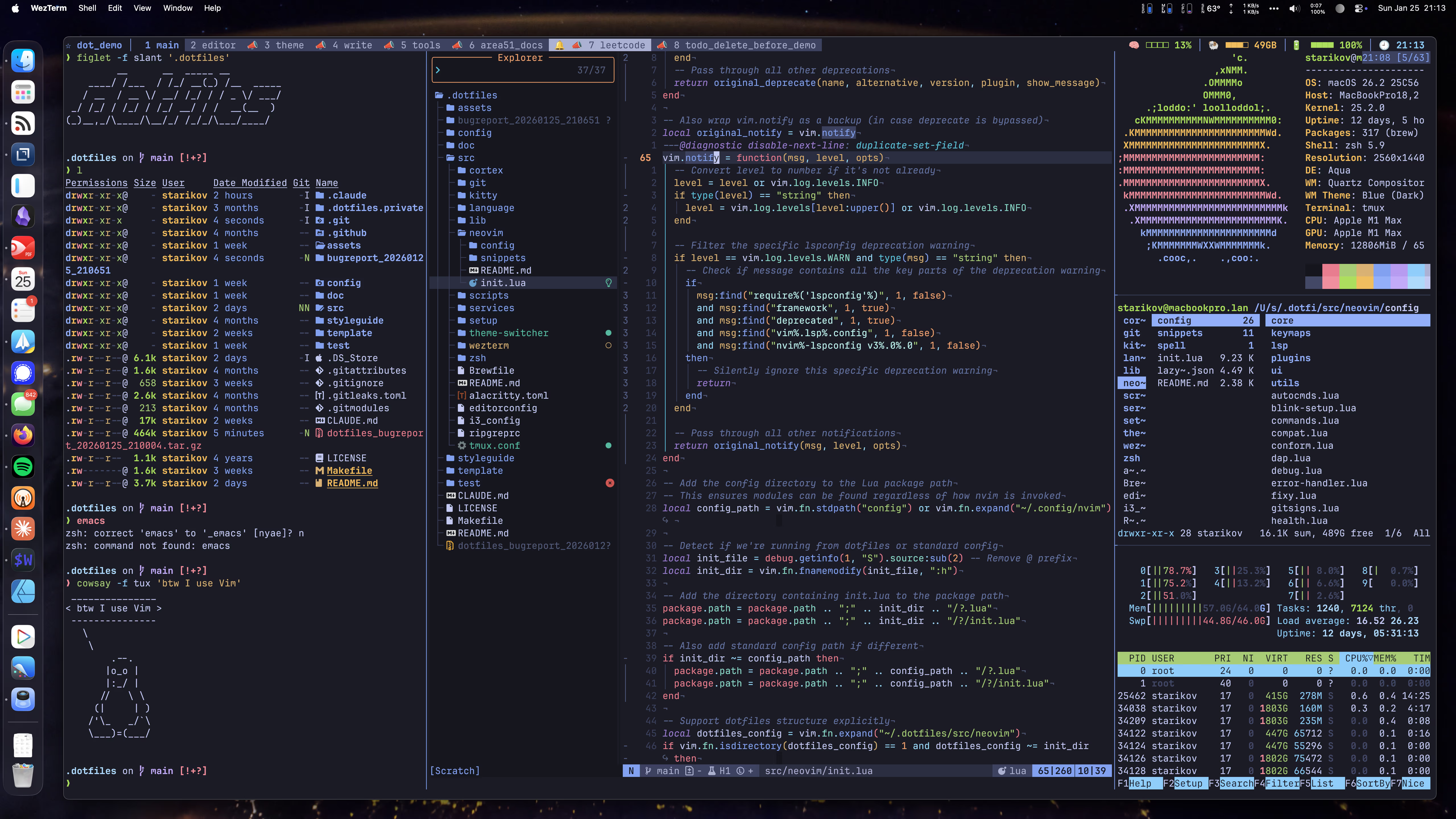
The decade of shell
The git history starts in March 2017. The habits are older than that. This is the home directory I have carried across every machine I have owned for the better part of a decade — the editor, the shell, the prompt, the git config, the theme — and it has been refined by daily use the entire time. Nothing here is aspirational. If a setting survived, it earned it by never getting in my way.
That longevity is the whole point. A dotfiles repo you rewrite every year is a hobby. One you keep for ten is infrastructure. Roughly 116.8K lines across 770 files sounds like a lot until you realise every one of them is a decision I have made more than once and would make again — a keybinding I reach for without thinking, a formatter I trust to not mangle a file, a color I want in front of me at 2am.
The signature is theme switching. Type theme moon and the terminal, the editor, tmux,
the prompt, bat, and delta all change together, atomically, in under half a second.
It also follows macOS: flip the system into dark mode and the whole toolchain follows.
This site is the ninth thing that palette drives — the colors you are reading right now
are generated from the same colors.json files that theme my terminal. That is not a
metaphor. It is a build step.
Everything below is measured. The numbers are reproducible from a checkout; I lead with them because in a dotfiles repo the numbers are the argument.
Highlights
Ten years, still in daily use
Some 770 tracked files, versioned since 2017, installed with a single
install.sh and removed just as cleanly. macOS and four Linux package-manager
families from the same tree. It is battle-tested in the most literal sense — every line has been
in my way at least once and stayed anyway.
fixy, one formatter for everything
fixy is a single 1,188-line zsh script that picks the right formatter for whatever
you hand it: 31 formatters wired across 60 file types, priority-ordered so
ruff beats black beats autopep8 on Python and the right tool always wins. One
command — fixy --all file — normalizes trailing whitespace, tabs, and smart quotes,
then formats and sorts. I never think about which formatter a file needs.
The theme engine
57 theme variants across 17 families, each expressed as one colors.json. A switch
rewrites 8 applications — Alacritty, WezTerm, Kitty, tmux, Starship, Neovim, bat,
delta — in under 500ms, atomically, and auto-syncs with the macOS appearance. This
is the engine this website is built on: app number nine.
Neovim that stays fast
More than fifty plugins managed by lazy.nvim, and it still cold-starts in about ~150ms on an M1 — LSP for twenty-plus languages, completion, AI, and a full Telescope setup, none of it paid for at startup. Fast is a feature you notice a hundred times a day. (Measured locally on 2026-07-26, not by this build — see the colophon.)
Dotfiles you can actually test
376 test functions across unit, functional, integration, performance, smoke, stress, and end-to-end suites, run by 6 GitHub Actions workflows. A config repo that tests itself sounds like overkill right up until an OS update quietly breaks your shell and the suite tells you before you find out the hard way.
Written down, not remembered
80 markdown documents — a README beside almost every component, plus setup, usage, and customization guides. Future-me is the primary reader. The docs are why I can leave this alone for six months and still know how the theme pipeline fits together.
Architecture
The repo is three trees. src/ holds the configs and the machinery: the Neovim setup,
the zsh environment, the git config, the scripts/ (where fixy lives), and theme/,
the switching engine with its per-family colors.json and app templates. test/ holds
the 376 test functions, bucketed by kind. doc/ holds the 80 guides. config/ carries
the data the scripts read — fixy.json’s formatter table, themes.json’s manifest of
all 57 variants.
The theme switch is the piece I am proudest of, and it turns on one small, boring detail:
the file swap has to be atomic. If a running shell reads its theme file mid-write, it gets
garbage. So every app’s theme is copied to a temp sibling and renamed into place — mv
on the same filesystem is atomic, so a reader sees either the old file or the new one,
never a torn one:
# Copy a theme file into place without a torn read: write to a temp
# sibling, set its mode, then rename. mv on one filesystem is atomic,
# so a shell reading its theme never sees a half-written file.
atomic_update() {
  local source="$1" dest="$2" mode="${3:-644}"
  [[ -f "$source" ]] || { log "Source file not found: $source" "WARN"; return 1; }

  local temp_file="${dest}.tmp.$$"
  cp "$source" "$temp_file"  || { rm -f "$temp_file"; return 1; }
  chmod "$mode" "$temp_file"
  mv -f "$temp_file" "$dest"  || { rm -f "$temp_file"; return 1; }
}
That block is highlighted live by Shiki’s css-variables theme — the colors are this
site’s current palette, drawn from the same theme engine the code is about. Switch themes
in the sidebar and watch it recolor. That is the whole story in one paragraph of shell.